🔐 BG678 Login â€ĸ Account Access

BG678 Login – Access Your Account

Access BG678 using your registered phone number or email address. Enter your account password to log in, or use the available recovery option if you have forgotten your password.

📱 Phone Login âœ‰ī¸ Email Login 🔐 Password Access 📲 Android App
BG678 account access Existing or new user?
Register Guide
Login Preview

BG678 Login Page

The BG678 login screen supports account access using a registered phone number or email. The example below shows the phone login interface.
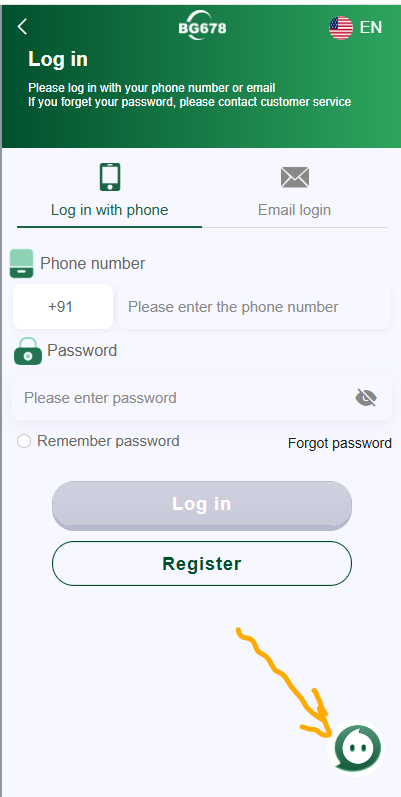
BG678 login page showing phone number email login password and forgot password options
BG678 login screen with phone login, email login, password and account recovery options.
Account Access

BG678 Login Methods

Choose the login method associated with the details used when creating your BG678 account.

📱

Login With Phone

Enter the phone number linked to your BG678 account and then enter your account password.

âœ‰ī¸

Email Login

If your account was created using email, choose the email login tab and enter the applicable account details.

Simple Instructions

How to Login to BG678

Follow these steps to access an existing BG678 account.

1

Open BG678

Open the BG678 account platform or launch the installed mobile app.

2

Select Login Type

Choose phone login or email login according to your registered account.

3

Enter Password

Enter your registered phone or email information and account password.

4

Tap Log In

Check your details and tap the Log In button to access your account.

Troubleshooting

BG678 Login Help

If you cannot access your account, check these common login issues before trying again.

🔑
Forgot Password

Use the Forgot Password option shown on the BG678 login screen or follow the available account recovery instructions.

📞
Check Phone Number

Make sure you are entering the same phone number and applicable country code used for your account.

đŸ‘ī¸
Check Your Password

Passwords are case-sensitive. Use the password visibility option when available to check for typing errors.

đŸ›Ąī¸
Protect your BG678 account

Never share your password, verification codes or other account credentials with another person. Avoid entering your login information on unfamiliar pages.

👤 NEW TO BG678?

Create an Account or Get the App

If you do not yet have a BG678 account, view our registration guide. Android users can also download the app directly.

Login Questions

BG678 Login FAQ

How do I login to BG678?
Open BG678, choose phone or email login, enter the account details you registered with and provide your password before tapping Log In.
Can I login to BG678 with my phone number?
Yes. The supplied BG678 login screen includes a phone login option where users enter their registered phone number and password.
Does BG678 support email login?
Yes. The login screen includes an Email Login tab for accounts associated with an email address.
What should I do if I forget my BG678 password?
Use the Forgot Password option displayed on the login page and follow the available account recovery instructions. The supplied login screen also advises users to contact customer service when necessary.
Can I save my BG678 password?
The supplied login interface displays a Remember Password option. Only use password-saving features on a private device that you control.
How do I create a new BG678 account?
New users can open the BG678 registration page and register using the available phone or email registration method.
Can I login from the BG678 Android app?
Android users can install the available BG678 mobile app and use their registered account credentials to access supported account features.
Important: Login screens, account recovery methods and available access options may change. Always use the current BG678 interface and keep your password and verification information private. This page is a login guide and does not collect or process your BG678 credentials.
Scroll to Top